Rendering Custom Payload Lexical Blocks in Version Diff View
This article shows how to render meaningful version diffs for custom Lexical blocks in Payload CMS — by registering a custom DiffComponent backed by auto-generated field converters.

When a Lexical rich text field contains custom blocks, Payload's version diff view renders them by slug — my-block-slug instead of the field values that changed:
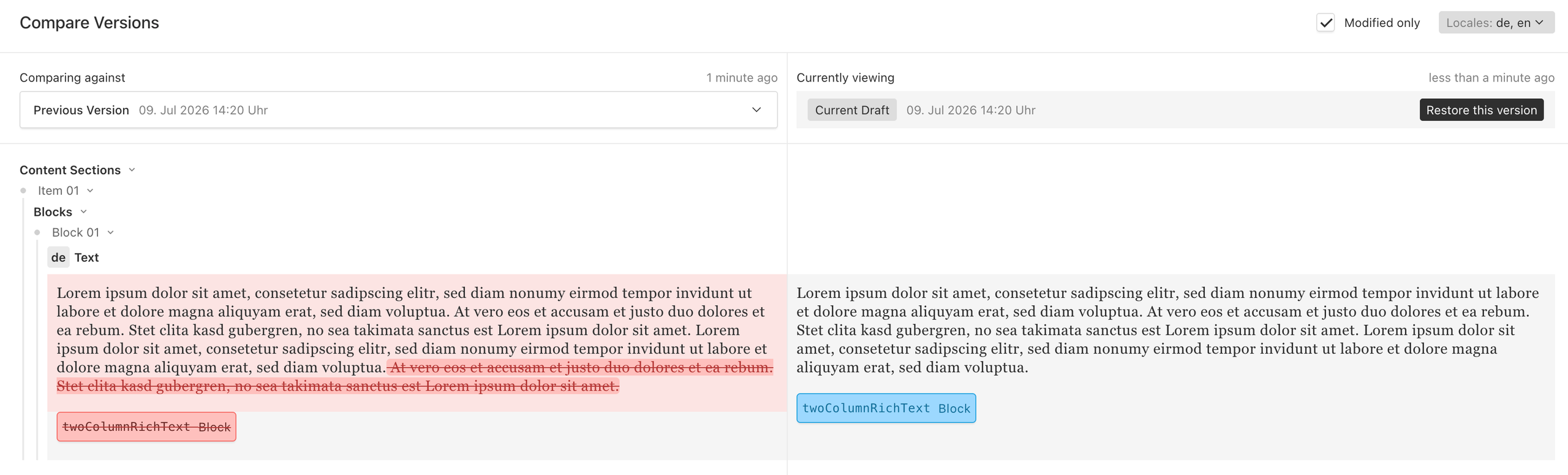
That makes version comparison useless for any block with more than one meaningful field. The fix is a custom DiffComponent: a React Server Component that Payload renders when it compares two versions of a rich text field.
The approach has three parts, and the sections below follow that order. First, register a custom DiffComponent so Payload calls our code for the field. Second, inside that component, convert both versions of the content to HTML and hand the two strings to Payload's own diffing utility. Third, generate that HTML automatically from each block's field config, so new blocks need no extra work.
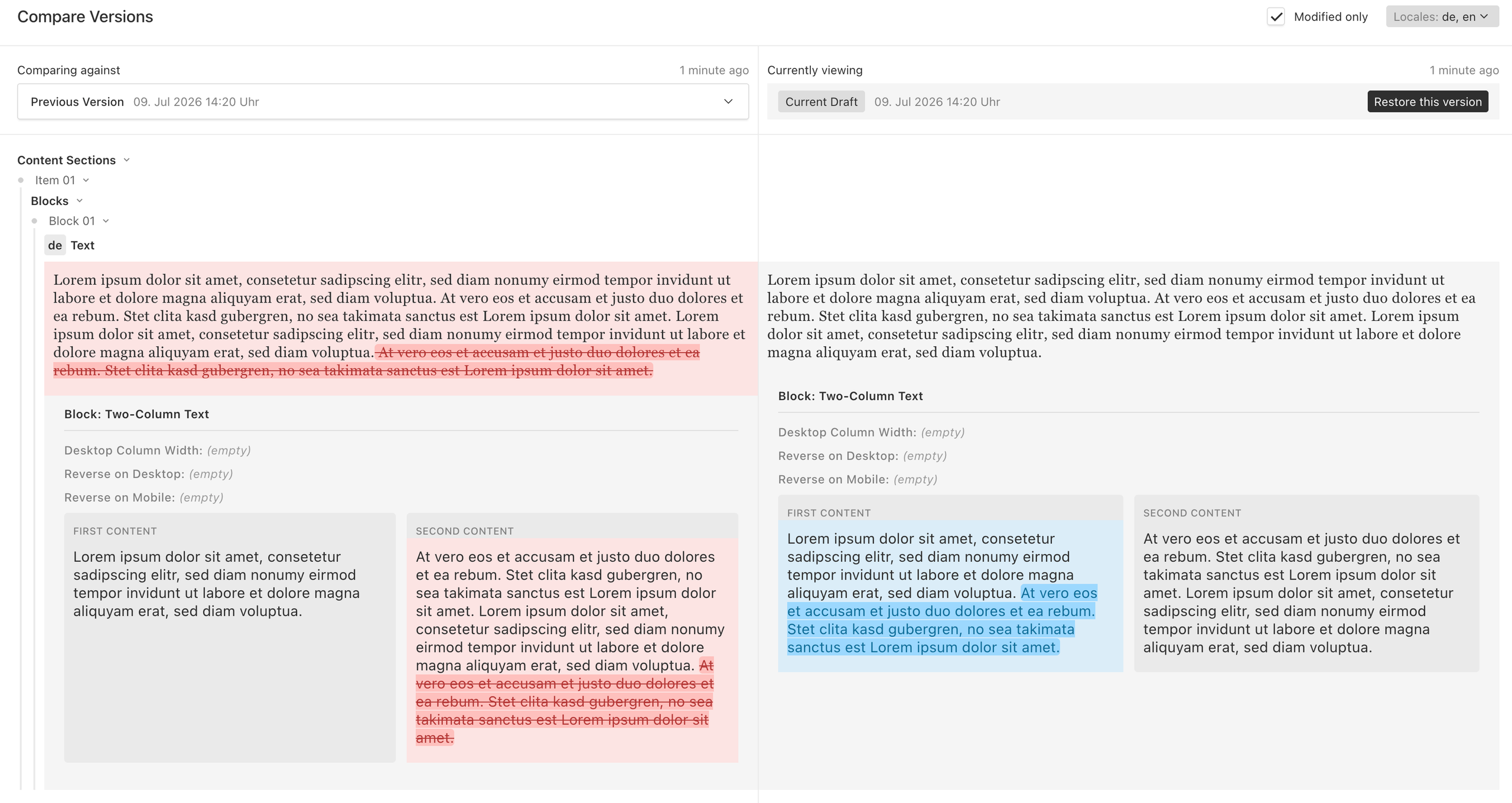
The result will look like this:
A Custom DiffComponent
Payload resolves admin components through a static import map, not through direct imports. You don't pass a component instance — you pass a path string (like /shared/lexical/LexicalBlocksDiffComponent#LexicalBlocksDiffComponent) that Payload looks up in a generated importMap.js. There are two problems to solve: telling the editor which diff component to use, and making sure that component is registered in the import map so Payload can find it at runtime.
Overriding the Editor's DiffComponent
We wrapped lexicalEditor() in a small helper, lexicalEditorWithBlockDiff, that handles both in one place:
/**
 * Wraps `lexicalEditor()` and replaces the default `DiffComponent` with a
 * project-provided one, registering it in the generated import map.
 */
export const lexicalEditorWithBlockDiff = (
  args: LexicalEditorArgs | undefined,
  { diffComponentPath }: Options,
) => {
  const base = lexicalEditor(args)
  return async (ctx: Parameters<ReturnType<typeof lexicalEditor>>[0]) => {
    const result = await base(ctx)
    const baseGenerateImportMap = result.generateImportMap
    return {
      ...result,
      DiffComponent: diffComponentPath,
      generateImportMap: (
        importMapArgs: Parameters<NonNullable<typeof baseGenerateImportMap>>[0],
      ) => {
        baseGenerateImportMap?.(importMapArgs)
        importMapArgs.addToImportMap(diffComponentPath)
      },
    }
  }
}
Two things happen here:
DiffComponent— overridden with our own path string.generateImportMap— extended so our component gets added to the import map alongside Payload's defaults. Without this, Payload can't resolve the path and the diff view breaks.
The wrapper is transparent about everything else, so it can replace lexicalEditor(...) anywhere: the root editor in payload.config.ts, and any nested rich text field inside a block that defines its own editor.
In the config, it's a drop-in replacement for lexicalEditor(). diffComponentPath is the same static import-map path the wrapper registers:
editor: lexicalEditorWithBlockDiff(
  {
    features: ({ defaultFeatures }) => [
      ...defaultFeatures,
      BlocksFeature({ blocks: [/* your blocks */] }),
    ],
  },
  { diffComponentPath: '/shared/lexical/LexicalBlocksDiffComponent#LexicalBlocksDiffComponent' },
)
The path resolves to the diff component that does the actual work — we build it in the next section. After wiring it up, regenerate the import map (payload generate:importmap) so Payload can resolve it.
Rendering Blocks as HTML, Then Diffing the Result
Payload ships getHTMLDiffComponents, a utility that takes fromHTML and toHTML strings and produces highlighted before/after React trees. The approach: convert each version of the Lexical state into HTML, then let Payload diff the result — no custom diffing logic needed.
createLexicalBlocksDiffComponent returns a RichTextFieldDiffServerComponent that:
- Builds a populate function with getPayloadPopulateFn, so relationships and uploads inside blocks can be resolved to real data.
- Converts the before (comparisonValue) and after (versionValue) Lexical states to HTML with
convertLexicalToHTMLAsync, using a converter map that knows how to render custom blocks. - Feeds both strings into
getHTMLDiffComponents. - Wraps the result in Payload's
FieldDiffContainerso it looks native.
Payload invokes the component with the request (req) and the two field values to compare. converters is the per-block map assembled in the next section — one converter per registered block, plus any overrides. The core is short:
// Resolves related documents (relationships, uploads) up to one level deep.
const populate = await getPayloadPopulateFn({ currentDepth: 0, depth: 1, req })

const fromHTML = await convertLexicalToHTMLAsync({ converters, data: valueFrom, populate }) // valueFrom = comparisonValue
const toHTML   = await convertLexicalToHTMLAsync({ converters, data: valueTo,   populate }) // valueTo   = versionValue

const { From, To } = getHTMLDiffComponents({
  fromHTML: fromHTML?.length ? fromHTML : '<p></p>',
  toHTML:   toHTML?.length   ? toHTML   : '<p></p>',
})
Passing populate into convertLexicalToHTMLAsync is what lets the converters resolve relationships and uploads inside blocks, so the diff can show "Author: Jane Doe" or an actual image thumbnail instead of a raw document ID. The depth: 1 keeps population shallow: enough to render a title or thumbnail, without pulling in the entire relationship graph.
createLexicalBlocksDiffComponent is a factory. The file the import-map path resolves to does nothing more than call it and export the result — this is the component Payload loads for the diff view:
// LexicalBlocksDiffComponent.tsx — the file the import-map path resolves to
export const LexicalBlocksDiffComponent = createLexicalBlocksDiffComponent({
  overrides: blockOverrides, // optional; see below
})
Auto-Generated Converters
Writing an HTML converter by hand for every block is just a different flavour of the original problem. Instead, the component walks each block's Payload field config and generates a converter automatically.
At render time it reads req.payload.config.blocks and builds a converter for each registered block from its field definitions:
// allBlocks = req.payload.config.blocks; blocksMap is a slug → config lookup
const autoConverters: BlockDiffConvertersMap = {}
for (const block of allBlocks) {
  autoConverters[block.slug] = createAutoBlockConverter(block, blocksMap, { locale })
}
const blocks = { ...autoConverters, ...overrides }

// this is the `converters` passed to convertLexicalToHTMLAsync above
const converters = ({ defaultConverters }) => ({
  ...defaultConverters,
  blocks: { ...defaultConverters.blocks, ...blocks },
})
createAutoBlockConverter recursively walks the block's fields and renders each with a helper suited to its type — scalar fields become Label: value rows, relationships and uploads resolve to a title or thumbnail, and nested richText recurses through the same converter map so blocks inside blocks just work. Structural wrappers (rows, tabs) are flattened; hidden and UI-only fields are skipped.
The result: add a new block to your Lexical editor and it shows up in the version diff with a readable, field-by-field layout — no extra code.
Escape Hatches for Custom Layouts
Auto-generation covers the common case, but some blocks need a layout the walker can't infer — side-by-side columns, custom groupings, and so on. Pass an overrides map that merges on top of the auto-generated converters:
const TwoColumnRichTextOverride: BlockDiffConverter<TwoColumnRichTextBlock> = async (args) => {
  const { firstContent, secondContent } = args.node.fields
  const [first, second] = await Promise.all([
    richText(args, firstContent),
    richText(args, secondContent),
  ])
  return blockContainer(
    'Two-Column Text',
    `<div style="${styles.columns}">
       <div style="${styles.column}">${first}</div>
       <div style="${styles.column}">${second}</div>
     </div>`,
  )
}

export const blockOverrides = defineBlockConverters({
  twoColumnRichText: TwoColumnRichTextOverride,
})
A small kit of helpers — blockContainer, field, richText, uploadArray, and a styles map wired to Payload's admin CSS variables like --theme-elevation-* — keeps overrides short and makes them blend into the admin UI's light and dark themes.
The full code is available at github.com/jhb-dev/payload-lexical-block-diff.
Conclusion
Swapping in a custom DiffComponent and pairing it with auto-generated field converters turns Payload's version diff from a list of block slugs into a field-level comparison that's actually useful. New blocks get readable diffs automatically; the few that need a custom layout can override just those. The full implementation is at the linked repository.